In latest version of Simplex Blognews ,Blog Archive and Stay connected are integrated as parts of template file . But the tip in this post can be applied with other templates if you want to add Blog Archive or Stay Connected .
A friend from Greece Konstantinos asked me for adding Stay Connected menu (like in Simplex Newsadvance II ) and Blog Archive to top navigation .
So in this post ,I want to show you how to add Stay connected and Blog Archive menu to top navigation bar . You can see the result in live demo of Simplex BlogNews
To add these features to Simplex Blognews template , please open template file in any word editor you have .
1, find this code
#navpages ul{
float:left;
}
and change it tofloat:left;
}
#navpages ul{
float:left;
width:70%;
}
2, find </head> and add this line above :
<script src="http://dinhquanghuy.110mb.com/template/jqueryslidemenu.js" type="text/javascript"></script>
this script will help us make dropdown menu .
3,Adding Blog Archive and Stay Connected menu :
In the template file ,you will see this code :
<div id="navpages">
<ul>
<b:section id='page' showaddelement='yes'>
<b:widget id='PageList1' locked='false' title='Pages' type='PageList'>
<b:includable id='main'>
<b:loop values='data:links' var='link'>
<li><a expr:href='data:link.href'><data:link.title/></a></li>
</b:loop>
</b:includable>
</b:widget>
</b:section>
</ul>
Replace the code above with this one :
<div id="navpages">
<ul>
<b:section id='page' showaddelement='yes'>
<b:widget id='PageList1' locked='false' title='Pages' type='PageList'>
<b:includable id='main'>
<b:loop values='data:links' var='link'>
<li><a expr:href='data:link.href'><data:link.title/></a></li>
</b:loop>
</b:includable>
</b:widget>
<b:widget id='BlogArchive1' locked='false' title='Blog Archive' type='BlogArchive'>
<b:includable id='main'>
<b:if cond='data:title'>
<li><a href=""><data:title/></a>
<b:include data='data' name='flat'/>
</li>
</b:if>
</b:includable>
<b:includable id='flat' var='data'>
<ul class='flat'>
<b:loop values='data:data' var='i'>
<li class='archivedate'>
<a expr:href='data:i.url'><data:i.name/></a>
</li>
</b:loop>
</ul>
</b:includable>
</b:widget>
</b:section>
<li class="">
<a href="#" title="">Stay Connected</a>
<ul>
<li><a href="/feeds/posts/default" class="gab_rss">Latest Posts in RSS</a></li>
<li><a title="/feeds/comments/default" rel="nofollow" href="" class="gab_rss">Latest Comments in RSS</a></li>
<li><a title="" rel="nofollow" href="Feedburner email" class="gab_email">Subscribe by e-mail</a></li>
<li><a title="" rel="nofollow" href="http://www.twitter.com/dinhquanghuy" class="gab_twitter">Follow us on Twitter</a></li>
<li><a title="" rel="nofollow" href="Facebookaccount" class="gab_facebook">Connect on Facebook</a></li>
</ul>
</li>
</ul>
Change the green text in bold to your social network account ,and to your Feedburner Subscribe link .
Save template .
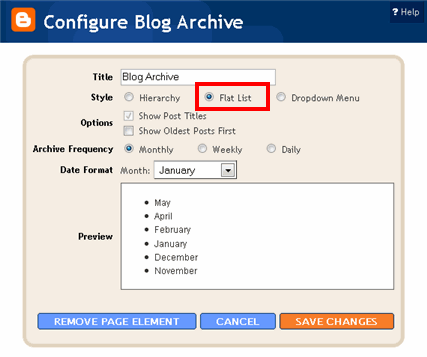
Go to Dashboard ,continue to Design ,then to Page element . Click on edit link in Blog Archive widget . In Configure Blog Archive dialog ,choose Flat List for Style option . In another option ,you can set it as you want .
That's all . I hope you will find this tip helpful .

Thank you. Yoy can visit http://kostasxan.blogspot.com to see the results
ReplyDeleteBy the way is it possible to change the background of the title labels?
i would like to suggest put "more articles" which links to the label page, below all labels should help to go the previos articles in the same label.
ReplyDeletedhurga from india
ReplyDeleteStill Didnt implimented it ,but surely this is one of the most useful blogger hacks out there . Archives have alwasy beeen problem in Blogger . Hope this will solve that too . love your work .
ReplyDeleteGood, but it's better if you stop re-name the original theme and call yourself designer, lol.
ReplyDelete@nicken :Ok,thanks for your comment . I will change it ^^ Btw,it's a text in footer and anyone can change it easily ^^
ReplyDelete